Turn good KPM into more real hours.
The leveling guide tells you when online beats offline. LDCloud is the tool check after that: if your account is already above the KPM threshold, keeping it online longer is where the gain comes from.

24/7 farming setup guide
LDCloud is a cloud phone option for players who want 24/7 uptime, steadier KPM checks, and less fuss than leaving BlueStacks or another emulator running on a home computer. Check the game from anywhere without remoting into your PC or leaving your main device tied up.
Register a new LDCloud account through the maplestoryidle.info link, then submit a claim after purchase. We rebate 10% back into that LDCloud account after LDCloud confirms the order under our referral.
KPM and EXP efficiency
The sample Auto Hunt Status screenshot shows about 105.9 monster kills per minute while online. For the calculator, this page rounds that to a 110 KPM online example against an 80 KPM offline/pass example. That gap is about 38% more kills while online, or about 27% fewer kills when dropping from 110 KPM to 80 KPM.
Over 8 hours, a 30 KPM gap can mean up to 86,400 fewer monster kills. Over a full month of always-on farming, the same gap can represent about 1,296,000 extra monster kills. Actual EXP depends on stage, buffs, job, kill speed, and whether the game stays online cleanly.
For the full leveling route, read the Offline vs Online Leveling Guide. This LDCloud page is the follow-up when KPM is already good and uptime becomes the bottleneck.
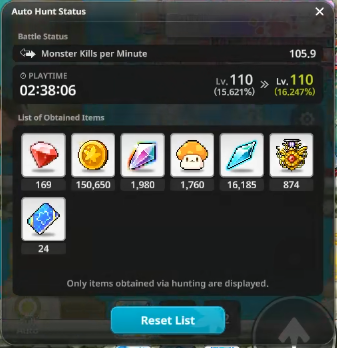
The leveling guide tells you when online beats offline. LDCloud is the tool check after that: if your account is already above the KPM threshold, keeping it online longer is where the gain comes from.
Cloud phone farming is most useful when MapleStory Idle should not compete with browser tabs, work calls, other games, Windows updates, restarts, fan noise, remote-desktop setup, or accidental sleep settings.
A PC emulator can feel free because the app costs nothing, but the setup can still use extra electricity, create heat, and occupy the machine. LDCloud is worth checking when the selected plan is close to the estimated extra cost and hassle of keeping a farming setup online.
Uptime value calculator
The point is not that LDCloud is always cheaper than every PC. The point is whether paying for a cloud phone makes sense after seeing the KPM gap, your expected uptime, PC wear-and-tear, and a rough cost comparison.
more kills while online in this example.
At a 30 KPM gap, 24 hours a day for 30 days is about 1,296,000 extra monster kills before EXP modifiers.
50 W x 24 h/day x 30 days x US$0.234/kWh
Electricity is an editable estimate, not a universal utility bill. The default 50 W assumes incremental or dedicated emulator draw; a whole gaming desktop left on only for farming can be much higher, while a PC already running anyway can be lower. It also does not price heat, fan hours, hardware wear, Windows restarts, crashes, or the inconvenience of tying up your main computer. Rates use public residential reference estimates, and LDCloud prices are shown as US$ because the reviewed checkout screenshots use US$. Sources: GlobalPetrolPrices electricity references and LDCloud checkout.
Recommended LDCloud setup
KVIP is the balanced tier shown in the checkout as the top seller. For one MapleStory Idle account, it gives more headroom than basic VIP without jumping to XVIP/MVIP pricing. Use VIP only as the cheaper test option.
Smooth and stable basic choice. Screenshots showed 3-4 cores, 4-6GB RAM, and 29-45GB ROM depending on server/system.
Balanced performance, top seller. Screenshots showed 4-6 cores, 5.3-8GB RAM, and 41-64GB ROM across visible setups.
Higher-performance tiers for heavier multitasking or multiple games. Usually more than needed for a single idle farming setup.
30 days
After rebate: US$11.6960 days
After rebate: US$17.99120 days, about US$0.25/day
After rebate: US$26.99365 days
After rebate: US$86.3930 days
After rebate: US$8.9960 days
After rebate: US$14.39120 days, about US$0.20/day
After rebate: US$21.59365 days
After rebate: US$69.29Prices and device specs are based on the LDCloud checkout screenshots reviewed for this page. Promo, discounted, and normal checkout purchases on an account registered through the maplestoryidle.info link are eligible for the same 10% post-payout rebate after LDCloud confirms the order under our referral.
Already using LDCloud?
LDCloud only tags the referral when a new account is registered through the maplestoryidle.info link. If your current LDCloud account was created before using our link, purchases on that old account cannot be matched to this rebate. Recurring orders are eligible only when LDCloud reports them under the tagged account.
Use the maplestoryidle.info LDCloud link first so the new account is tagged correctly.
Either buy a new device on the new account, or transfer your existing device from the old account to the new account.
Recurring orders on the tagged account can keep qualifying. Once LDCloud confirms and pays the referral commission, the 10% rebate is transferred into your LDCloud account.
Servers and plans
Taiwan, Singapore, United States, Thailand, Hong Kong, Korea, and Netherlands were visible in the LDCloud checkout screenshots.
VIP, KVIP, XVIP, and MVIP were visible. The screenshots focused on KVIP with Android 12 and Android 14 options.
Side-device route
Good if you already have a spare device or can buy a cheap refurbished phone. Saves your main phone battery, but you still manage heat, chargers, and app sleep settings.
Works well if your PC is already on. Less ideal when it adds electricity cost, fan noise, Windows restarts, crashes, or blocks your normal setup.
Best when you want low-maintenance 24/7 uptime and easy on-the-go checking without remoting into a home PC. The value comes from consistency, not magic damage or secret EXP boosts.
Decision route
maplestoryidle.info giveback
Register through the maplestoryidle.info LDCloud link, then submit a rebate claim after purchase. Instead of keeping the affiliate fee from your confirmed order, the site returns it as 10% savings back into your LDCloud account as a thank-you for supporting the tools and the community.